
A Private S3 Static Site Behind CloudFront with Terraform
Almost every static site tutorial tells you to flip on S3 static website hosting, mark the bucket public, and point a domain at it. That works, but it leaves your bucket world readable and skips the content delivery network (CDN) entirely. In regulated environments that is usually a non starter.
The pattern I reach for instead keeps the bucket completely private and puts Amazon CloudFront in front of it, using Origin Access Control (OAC) so that only the distribution can read objects. Here is the shape of it.
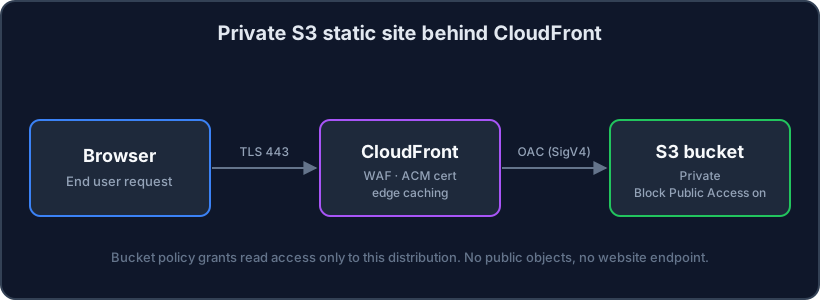
The bucket has Block Public Access switched on, no website endpoint, and a policy that trusts exactly one thing: the CloudFront distribution below it. Let me walk through the Terraform.
The bucket
Nothing public here. Block Public Access is on, and versioning is enabled so a bad deploy is recoverable.
resource "aws_s3_bucket" "site" {
  bucket = "bk-example-site"
}

resource "aws_s3_bucket_public_access_block" "site" {
  bucket = aws_s3_bucket.site.id

  block_public_acls       = true
  block_public_policy     = true
  ignore_public_acls      = true
  restrict_public_buckets = true
}

resource "aws_s3_bucket_versioning" "site" {
  bucket = aws_s3_bucket.site.id
  versioning_configuration {
    status = "Enabled"
  }
}
Origin Access Control
OAC is the modern replacement for the old Origin Access Identity. It signs requests to the origin with Signature Version 4 (SigV4), which is what lets us drop the public bucket entirely.
resource "aws_cloudfront_origin_access_control" "site" {
  name                              = "bk-example-site-oac"
  origin_access_control_origin_type = "s3"
  signing_behavior                  = "always"
  signing_protocol                  = "sigv4"
}
The distribution
The distribution points at the bucket’s regional domain name, attaches the OAC, and redirects any plain HTTP to HTTPS. I have trimmed the certificate and alias wiring for brevity.
resource "aws_cloudfront_distribution" "site" {
  enabled             = true
  default_root_object = "index.html"

  origin {
    domain_name              = aws_s3_bucket.site.bucket_regional_domain_name
    origin_id                = "s3-site"
    origin_access_control_id = aws_cloudfront_origin_access_control.site.id
  }

  default_cache_behavior {
    target_origin_id       = "s3-site"
    viewer_protocol_policy = "redirect-to-https"
    allowed_methods        = ["GET", "HEAD"]
    cached_methods         = ["GET", "HEAD"]

    # AWS managed "CachingOptimized" policy
    cache_policy_id = "658327ea-f89d-4fab-a63d-7e88639e58f6"
  }

  restrictions {
    geo_restriction {
      restriction_type = "none"
    }
  }

  viewer_certificate {
    cloudfront_default_certificate = true
  }
}
The bucket policy is the whole trick
This is the part that actually enforces the private origin. The bucket policy allows s3:GetObject, but only when the caller is the CloudFront service and the request comes from this exact distribution. The AWS:SourceArn condition is what stops any other distribution in any other account from reading your objects.
data "aws_iam_policy_document" "site" {
  statement {
    sid     = "AllowCloudFrontRead"
    actions = ["s3:GetObject"]
    resources = ["${aws_s3_bucket.site.arn}/*"]

    principals {
      type        = "Service"
      identifiers = ["cloudfront.amazonaws.com"]
    }

    condition {
      test     = "StringEquals"
      variable = "AWS:SourceArn"
      values   = [aws_cloudfront_distribution.site.arn]
    }
  }
}

resource "aws_s3_bucket_policy" "site" {
  bucket = aws_s3_bucket.site.id
  policy = data.aws_iam_policy_document.site.json
}
Least privilege in one line. The
AWS:SourceArncondition is the difference between “CloudFront can read this bucket” and “this distribution can read this bucket”. Always scope to the ARN.
Deploying content
Because the bucket is private, you push objects with the normal S3 application programming interface (API) and let CloudFront serve them. After an upload, invalidate the cache so viewers see the new build:
aws s3 sync ./public s3://bk-example-site --delete
aws cloudfront create-invalidation \
  --distribution-id "$DIST_ID" \
  --paths "/*"
What you end up with
- A bucket with no public access and no website endpoint.
- A CDN that terminates TLS at the edge and caches close to users.
- A single, ARN scoped trust relationship between the two.
It is a handful of resources, but every one of them is doing a job, and there is no public bucket waiting to be misconfigured. That is the version I am happy to ship in a financial services account.